Why your team struggles to adopt your CRM
· 6 min read · Français · עברית

In September, a small services company sends an invitation to its webinar to forty clients and prospects. Three quarters open it. Three people reply: a question, an interest, a request for a call back. Then the busy season starts, emergencies pile up, and nobody gets back to them.
These three replies aren't lost. They are there, somewhere in a mailbox, under hundreds of other messages. The company's CRM knows nothing about them: nobody copied them into it.
It is the most common symptom of a poorly adopted CRM. And contrary to what many managers think, the cause is almost never the salespeople's ill will. It fits in one sentence: the CRM sits next to the mailbox, instead of being built around it.
Your CRM's real competitor is the mailbox
A salesperson spends their days in two tools: their phone and their email, Outlook or Gmail. That is where clients write, where quotes are sent, where meetings are set. The mailbox is the sales team's real working tool. The CRM is often seen as one more tool, which has to be fed "for the manager".
In this competition, the mailbox always wins, for a simple reason: it fills itself. The CRM requires you to copy in what happened elsewhere. Every important email should be summarised in a record, every new contact entered by hand, every reply to a campaign ticked off. Nobody keeps that up for long.
After a few months, the CRM becomes a half-updated directory, and the history of the customer relationship keeps living in individual mailboxes. The day a salesperson leaves, they take part of that portfolio with them.

Four reasons why a CRM stays empty
When a team struggles to adopt its CRM, the same causes come up almost every time.
- Double entry. Everything that happened by email or phone has to be typed in again. It is time taken away from selling, and it is the first thing dropped when the month is busy.
- A tool designed for the manager. If the CRM mainly serves to produce reports for management, the salesperson experiences it as control, not as help.
- No immediate benefit for the person entering data. A salesperson adopts a tool that wins them a sale or saves them an hour a week, not one that costs them one.
- Most exchanges happen elsewhere. As long as emails and calls don't flow into the CRM on their own, it only sees a small part of the customer relationship, and its figures are wrong.
These four causes have something in common: they disappear when the CRM fetches the information where it lives, instead of waiting for someone to bring it.
Putting the mailbox at the heart of the CRM: what it changes
In Loukka, each salesperson connects their mailbox (Gmail, Outlook or the one from the company's email provider) in a few minutes. From then on, several things happen without any data entry.
- Emails are collected automatically, every five minutes, and filed in the activity of the record of the client or prospect concerned. When you open a record, you see the history of the exchanges, not just notes.
- A new contact is added in one click. When an email arrives from an address the CRM doesn't know, Loukka offers to create the contact and their company, guessed from the domain name, and files the emails already exchanged in their record.
- Emails from the same contact are grouped in a folder in their name, updated automatically.
- Replies to campaigns are recognised: a contact who replies to a mailing moves to "Replied" on their own, a bounced email marks them "Unreachable".
- The usual mailbox stays untouched. Nothing is moved, deleted or marked as read in Outlook or Gmail. And you choose what the CRM collects: only emails from known contacts and accounts, or the whole inbox.
The salesperson no longer has to choose between their email and the CRM: the CRM is their email, enriched with everything it knows about the client.
Waking up dormant opportunities
Let's go back to our September webinar. Once the mailbox is at the heart of the CRM, finding what slipped through takes five minutes, and that is exactly what our film shows.
First, those who read the invitation without replying. A list view is built with three conditions: the September campaign, the "Email sent" status (no reply) and the email tracking "opened" or "clicked". Out of forty contacts, twenty-one remain, who showed some interest, at least a little.

Next, those who replied and are still waiting. Rather than searching, you ask Loukka's AI assistant: "Who replied to me after the September webinar and is still waiting to hear from me?" It prepares the list, and you create it in one click. Three people, with their company.

All that's left is to write to each of them according to their situation: the webinar replay in three lines for the first group, an apology and a meeting proposal for the second. Two small campaigns, sent at the chosen pace from the salesperson's mailbox, whose replies will file themselves on the right record.
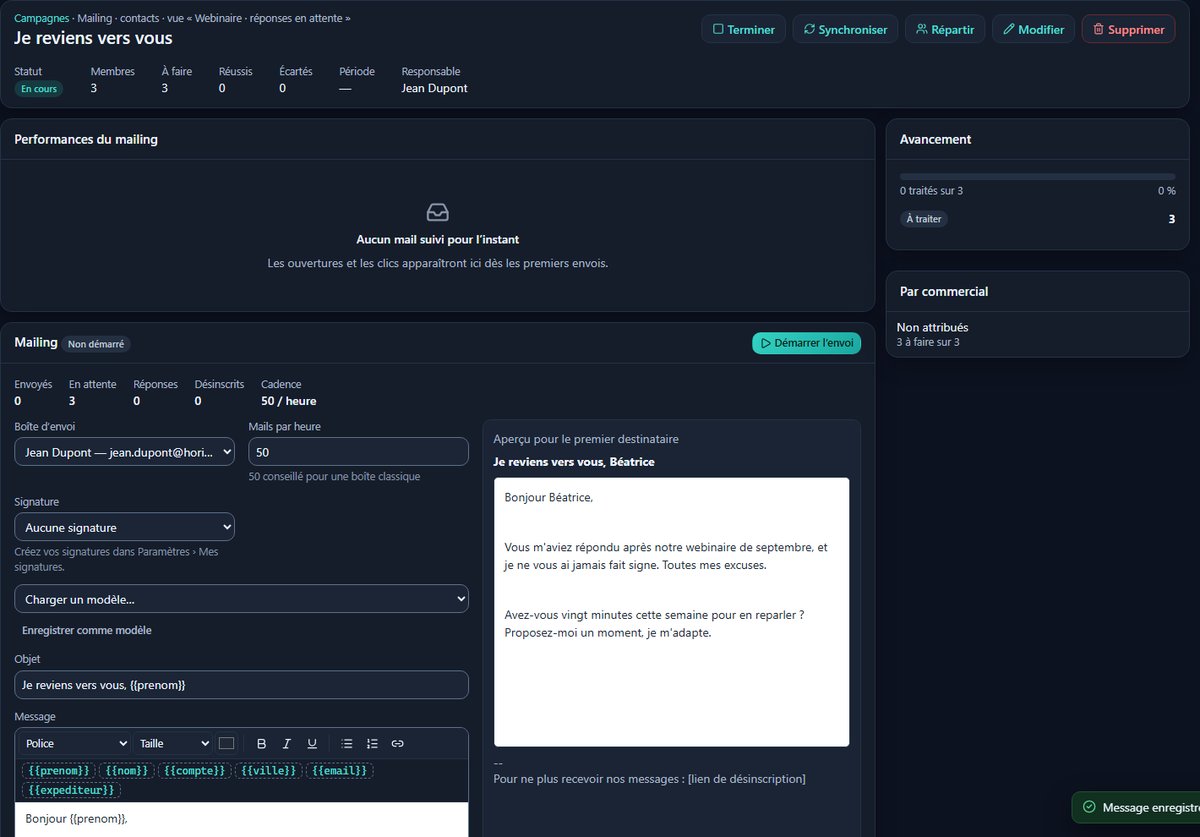
This isn't mass prospecting. These are medium-sized, buried opportunities: a quote that went nowhere, a prospect who had said "not now", a former client nobody followed up. For a small services company, that is often where the easiest revenue lies.
Five rules for successful CRM adoption
- Start by connecting the mailboxes. Before fields, stages and dashboards: as long as exchanges don't flow in on their own, the rest won't hold.
- Remove all double entry. Every time a salesperson copies a piece of information, ask yourself how the CRM could get it by itself: collected email, call made from the CRM, website form sent directly.
- Set up a short daily ritual. The daily briefing, five minutes in the morning, gives the salesperson a concrete reason to open the CRM: they find their follow-ups, their overdue items and the replies to handle.
- Share views useful to everyone. "Replied, to handle", "Quotes unanswered for 15 days", "Clients with no contact for six months": a few well-chosen lists are worth more than a long user manual.
- Show the salesperson what they gain. A deal revived thanks to a list, a client called back at the right time: these first wins drive adoption far more than an instruction from management.
Frequently asked questions
Do you need to change email provider to use a CRM integrated with the mailbox?
No. Loukka connects to the existing mailbox (Gmail, Outlook or the company's email provider). Salespeople keep using it normally, and nothing in it is moved or deleted.
Do my personal emails end up in the CRM?
You decide. Collection can be limited to emails exchanged with contacts and accounts the CRM knows. It doesn't pull in the whole mailbox history: only recent emails, from the time the mailbox is connected.
How long does it take to get started?
Connecting a mailbox takes a few minutes. The first emails are filed on the records within fifteen minutes, and the first follow-up list is built in five minutes.
Conclusion: your former contacts are dormant
If your team struggles to adopt your CRM, don't look first at discipline. Look at where the information lives: in the mailboxes. A CRM that connects to them stops being a data-entry chore and becomes the place where you find, in a few minutes, the clients waiting for a reply and the opportunities lying dormant.
Your former contacts are dormant. Loukka wakes them up. The simplest way is to see it on a fictitious team, with its campaigns, its replies and its AI assistant: Loukka's demo is available with no meeting and no commitment.